HLAXP Archived
Archived — this app is no longer maintained. Details preserved for reference.
Mainly developed by Tomas Stenarson in 2004.

HLAXP is a plugin for X-Plane flight simulator to provide the ability to participate in HLA federation executions. HLA (High Level Architecture) is a standard for distributed simulations. HLA was developed by the US Department of Defense and has been approved as an open standard through the IEEE (IEEE standard 1516). HLAXP is currently using the former HLA 1.3 draft standard.
HLAXP has been tested with X-Plane 7.30 on Windows XP using the following RTIs: DMSO RTI-NG1.3v6 and MäK RTI 2.1.
Only a Windows version of HLAXP is available because there is no RTI that supports Macintosh (April 2004).
Download
HLAXP is available as an evaluation version (HLAXP v0.95). This beta version of HLAXP will automatically resign from the federation three minutes after joining.
Windows version: HLAXPv0.95.zip
Installing
- Download the HLAXP distribution file and unzip it in a temporary folder.
- Copy the file hlaxp.xpl to the plugins folder in X-Plane.
- Copy the files hlaxp.ini and hlaxpexp.ini to the X-Plane preferences folder.
- Check the hlaxp.ini file to set your desired federate name, federation name and path to your fed-file (as fed-file you can use the bundled hlaxp.fed).
- Done!
Using HLAXP
Before using HLAXP you need an RTI installed, see your RTI documentation for specifics.
HLAXP adds a menu to X-Plane. Three menu items exist in v0.95:
- Join
- HLAXP tries to join the federation (and maybe create it if specified in the file hlaxp.ini). This may freeze X-Plane a couple of seconds depending on your RTI. HLAXP then creates the user aircraft in the federation.
- Resign
- HLAXP removes the user aircraft from the federation and tries to resign from the federation (and maybe destroy it).
- Create Ownship
- HLAXP creates the user's aircraft in the federation. The aircraft is removed when the user has crashed.
HLAXP receives the interaction StartResume and sets the date and time according to the parameters. When a MunitionDetonation interaction is received, the DetonationLocation and/or TargetObjectIdentifier + RelativeDetonationLocation is used to calculate if the user's aircraft was hit. The following DetonationResultCodes are considered as a hit when close enough (currently 100 m): EntityImpact, EntityProximateDetonation, Detonation, AirHit, AirBurst.
General configuration
HLAXP is configured using the file hlaxp.ini, the syntax is simple
and straight-forward: <Parameter name> <value>.
Configurable parameters:
- AUTOJOIN
- 1 = YES, 0 = NO
- CREATE
- 1 = YES, 0 = NO
- FEDERATION
- Name of the federation execution to (create and) join
- FEDERATE
- Name of the X-Plane federate
- FEDFILE
- Path to the fed-file (only necessary when creating the federation)
- TIMESTEP
- Number of seconds between updates (valid range: ]0.0, 2.0])
- SITEID
- SiteID used in FederateIdentifier
- APPLICATIONID
- ApplicationID used in FederateIdentifier
- FORCEID
- ForceIdentifierEnum8 value according to SOM (valid range: [0, 3])
Entity type configuration
To specify the entity type for exported aircraft, use the file
hlaxpexp.ini. The syntax is:
<Keyword> <Kind> <Domain> <Country> <Category> <Subcategory> <Specific> <Extra>.
Keyword is a string used to identify a specific aircraft in your X-Plane
installation; the keyword is matched with the path or filename of your
aircraft file (first match used). The rest are integers matching the
DIS-enumerations.
Example — matching an X-Plane aircraft with the string "B-747" in the
pathname or filename with a US "Boeing 747-400" (according to DIS
Enumerations document 2003): B-747 1 2 225 57 1 1 0. The
"Extra" field is not specified in the document and can e.g. be used to
identify a specific airline or even a specific aircraft.
HLAXP v0.95 SOM
HLAXP uses a Simulation Object Model that's a part of the RPR-FOM V2.0 Draft 9 (see SISO for more information on RPR-FOM).
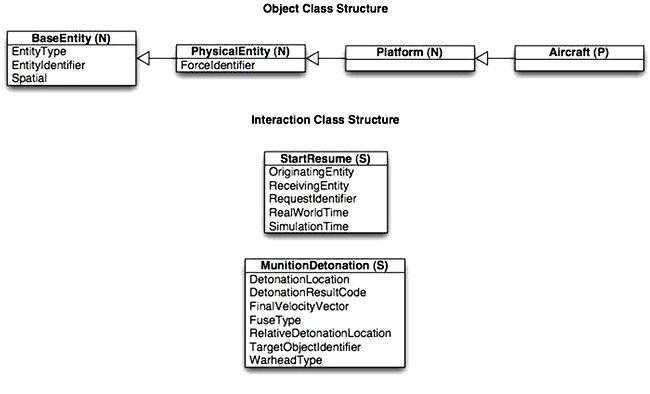
HLAXP v0.95 only publishes one type of object — Aircraft — with the following attributes provided:
- EntityType
- Fully user configurable using HLAXP configuration files
- EntityIdentifier
- SiteID and ApplicationID user configurable
- Spatial
- Position, Velocity, Acceleration and Attitude using SpatialFWStruct; no dead reckoning implemented
- ForceIdentifier
- Fully user configurable using HLAXP configuration file
HLAXP v0.95 subscribes to the interactions StartResume and MunitionDetonation. The StartResume interaction is only used to set the date and time (no start/stop/pause functionality).
HLAXP v0.95 SOM vs. RPR-FOM2 D9
- HLAXP v0.95 doesn't use timestamps.
- HLAXP v0.95 doesn't use dead reckoning — spatial data is published as DR algorithm no. 5 (DRM_FVW) though.
Information links
Customer specific development
Memention are willing to adapt HLAXP to your specific needs, e.g. modify the SOM or develop specific HLA functionality to make X-Plane fit into your federation. Please contact us if you have any questions so we can discuss the details.
We can also make the source code available for customer specific needs. Please contact us if you have any questions so we can discuss the details.
Version history
- 0.95
- Evaluation release; auto-resigns from federation after three minutes
- 0.9
- Earlier beta release